



Alexander Nehme
Partner & Board Member, Nehmeh

Taps:
195



With over 70 years of service, we’ve nourished countless solutions, partnerships, connections and innovations built on a shared passion of quality, performance, technology & first-class customer service.
We’re constantly building an organization to last, offering solutions and building brands that will continue to benefit people, communities & companies together for the next seventy years and beyond.
Nehmeh is recognized as one of the leading integrated manufacturing & trading serving the Middle East region helping create value through reliable performance solutions for specialized industries. Nehmeh is engaged in every aspect of the automotive, construction, HVAC, rentals, service and the woodworking industries, including manufacturing, distribution, marketing, sales and aftersales.
As the trusted partner of choice, companies choose Nehmeh's award-winning industrial solutions of quality, process & engineering can improve your productivity, efficiency, safety record & return.
The original company name, Anton Nehmeh, whose roots can be traced back to 1955 in Doha, Qatar. As years went by and experiences were gained, Nehmeh were appointed authorized dealers for many world renowned brands and has made those brands leaders in the market it serves. Constantly investing in the future, Nehmeh is further recognized for its professionalism, quality, technology and its award-winning sustainability strategy.






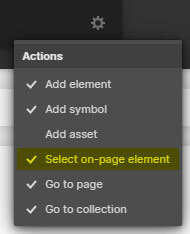
Press "Ctrl + E" or "Cmd + E" in the Designer and enable "Select on-page element".
Search for the class named, "Cloneable Area".
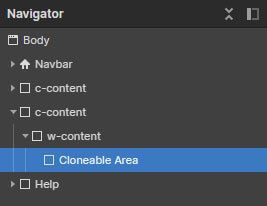
Copy the element inside this container to your own project.
Rename the classes accordingly if they are clashing with your project.
Ensure custom code from the in-page setting has been copied into your project as well (if there's any).
'Page Trigger' interaction can't be copied directly. You can only clone the whole project, or rebuild it.
A simple trick to copy the 'Page Trigger' interaction into another project is as below:
1. Create a dummy element.
2. Apply any type of 'Element trigger' into the dummy element and select the 'Page Trigger' animation.
3. Copy the dummy element with the animations applied into your new project.
4. The animation should have been copied into your project and you can reapply the 'Page Trigger' animation into your project.
If you have further inquiry or need assistance, feel free to contact us.
Lastly, please do not copy this project and claim it as your own. We wish to continue sharing and giving to the community. In order to do so, we will need your cooperation and full support. Thank you very much,