



Lilibeth Ramos
Finance Manager, BSC

Taps:
29



I am deeply committed to my work at Business Setup Consultants, with nearly 22 years of experience in accounting. Since 2016, I've served as the finance manager, building strong client relationships and providing tailored financial advice. My role involves strategic planning, budgeting, and ensuring informed business decisions. Our team specializes in VAT registration, filing, audit reports, and corporate tax management, keeping clients compliant with regulations. We’re dedicated to streamlining your accounting processes, helping you avoid penalties, and ensuring your business thrives. Let us support your journey to financial success.

+971526442092

accounts@businessetup.com

www.businessetup.com

Suite 2702, Jumeirah Bay X3 , Cluster x, JLT, Dubai , UAE






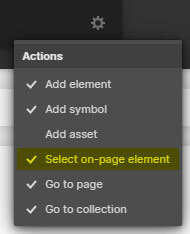
Press "Ctrl + E" or "Cmd + E" in the Designer and enable "Select on-page element".
Search for the class named, "Cloneable Area".
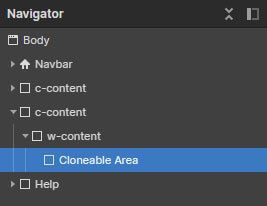
Copy the element inside this container to your own project.
Rename the classes accordingly if they are clashing with your project.
Ensure custom code from the in-page setting has been copied into your project as well (if there's any).
'Page Trigger' interaction can't be copied directly. You can only clone the whole project, or rebuild it.
A simple trick to copy the 'Page Trigger' interaction into another project is as below:
1. Create a dummy element.
2. Apply any type of 'Element trigger' into the dummy element and select the 'Page Trigger' animation.
3. Copy the dummy element with the animations applied into your new project.
4. The animation should have been copied into your project and you can reapply the 'Page Trigger' animation into your project.
If you have further inquiry or need assistance, feel free to contact us.
Lastly, please do not copy this project and claim it as your own. We wish to continue sharing and giving to the community. In order to do so, we will need your cooperation and full support. Thank you very much,