



Iqbal Hanif
CEO, Swenta Solutions

Taps:
4



As CEO of Swenta Solutions, I lead a technology transformation and implementation company focused on helping organizations move from ambition to execution across Technology, Artificial Intelligence and Data. Swenta works with businesses navigating complex transformation — from modernizing legacy technology and fragmented platforms to implementing AI, automation and modern data capabilities that improve efficiency, customer experience and business performance. Drawing on more than 25 years of leadership across technology, payments, product and digital transformation, including senior executive roles at Visa and The ENTERTAINER, I bring a practitioner-led approach to Swenta: we don't just advise on transformation — we help design, build and implement it.


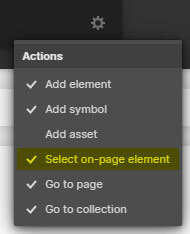
Press "Ctrl + E" or "Cmd + E" in the Designer and enable "Select on-page element".
Search for the class named, "Cloneable Area".
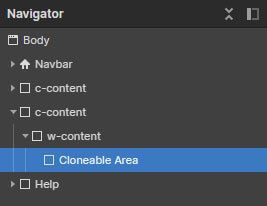
Copy the element inside this container to your own project.
Rename the classes accordingly if they are clashing with your project.
Ensure custom code from the in-page setting has been copied into your project as well (if there's any).
'Page Trigger' interaction can't be copied directly. You can only clone the whole project, or rebuild it.
A simple trick to copy the 'Page Trigger' interaction into another project is as below:
1. Create a dummy element.
2. Apply any type of 'Element trigger' into the dummy element and select the 'Page Trigger' animation.
3. Copy the dummy element with the animations applied into your new project.
4. The animation should have been copied into your project and you can reapply the 'Page Trigger' animation into your project.
If you have further inquiry or need assistance, feel free to contact us.
Lastly, please do not copy this project and claim it as your own. We wish to continue sharing and giving to the community. In order to do so, we will need your cooperation and full support. Thank you very much,