



Samar Abdelsalam
Director of Procurement

Taps:
53



An experienced, creative, and seasoned leader in medical solutions assessment and evaluation, I bring a wealth of knowledge and expertise in healthcare management. With a keen eye for identifying and implementing innovative healthcare solutions, my passion lies in improving patient outcomes and enhancing operational efficiency. I am dedicated to providing insightful consultations, leveraging my in-depth understanding of the healthcare landscape and a strategic approach to problem-solving.

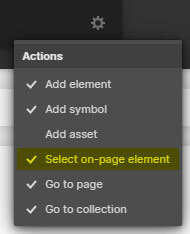
Press "Ctrl + E" or "Cmd + E" in the Designer and enable "Select on-page element".
Search for the class named, "Cloneable Area".
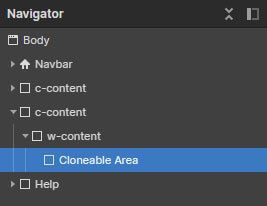
Copy the element inside this container to your own project.
Rename the classes accordingly if they are clashing with your project.
Ensure custom code from the in-page setting has been copied into your project as well (if there's any).
'Page Trigger' interaction can't be copied directly. You can only clone the whole project, or rebuild it.
A simple trick to copy the 'Page Trigger' interaction into another project is as below:
1. Create a dummy element.
2. Apply any type of 'Element trigger' into the dummy element and select the 'Page Trigger' animation.
3. Copy the dummy element with the animations applied into your new project.
4. The animation should have been copied into your project and you can reapply the 'Page Trigger' animation into your project.
If you have further inquiry or need assistance, feel free to contact us.
Lastly, please do not copy this project and claim it as your own. We wish to continue sharing and giving to the community. In order to do so, we will need your cooperation and full support. Thank you very much,