



Suman Jangir
Marketing Manager, Pangea Events, Travel And Tourism

Taps:
7



As Marketing Manager at Pangea Events Dubai, I lead brand strategy and creative direction across digital and experiential platforms. My role bridges strategy and execution — from writing marketing plans, campaigns, and content calendars to conceptualizing event ideas that align business goals with emotional storytelling. With over 15 years of experience in marketing, design, and creative leadership, I bring a dual focus: analytical precision and artistic intuition. I oversee digital campaigns, social media, and SEO, while also guiding the creative team in developing event proposals, visuals, and brand experiences that reflect client intent and market insight. My approach is collaborative, data-aware, and deeply human — blending business intelligence with design empathy to create campaigns that perform, inspire, and build lasting brand equity. Focus Areas: Brand Strategy • Creative Direction • Campaign Planning • Event Concept Development • Digital Marketing • Content Creation


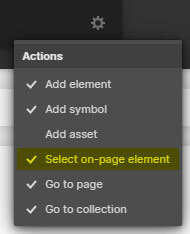
Press "Ctrl + E" or "Cmd + E" in the Designer and enable "Select on-page element".
Search for the class named, "Cloneable Area".
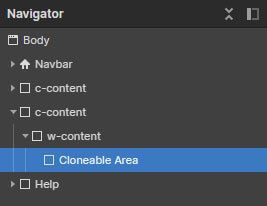
Copy the element inside this container to your own project.
Rename the classes accordingly if they are clashing with your project.
Ensure custom code from the in-page setting has been copied into your project as well (if there's any).
'Page Trigger' interaction can't be copied directly. You can only clone the whole project, or rebuild it.
A simple trick to copy the 'Page Trigger' interaction into another project is as below:
1. Create a dummy element.
2. Apply any type of 'Element trigger' into the dummy element and select the 'Page Trigger' animation.
3. Copy the dummy element with the animations applied into your new project.
4. The animation should have been copied into your project and you can reapply the 'Page Trigger' animation into your project.
If you have further inquiry or need assistance, feel free to contact us.
Lastly, please do not copy this project and claim it as your own. We wish to continue sharing and giving to the community. In order to do so, we will need your cooperation and full support. Thank you very much,